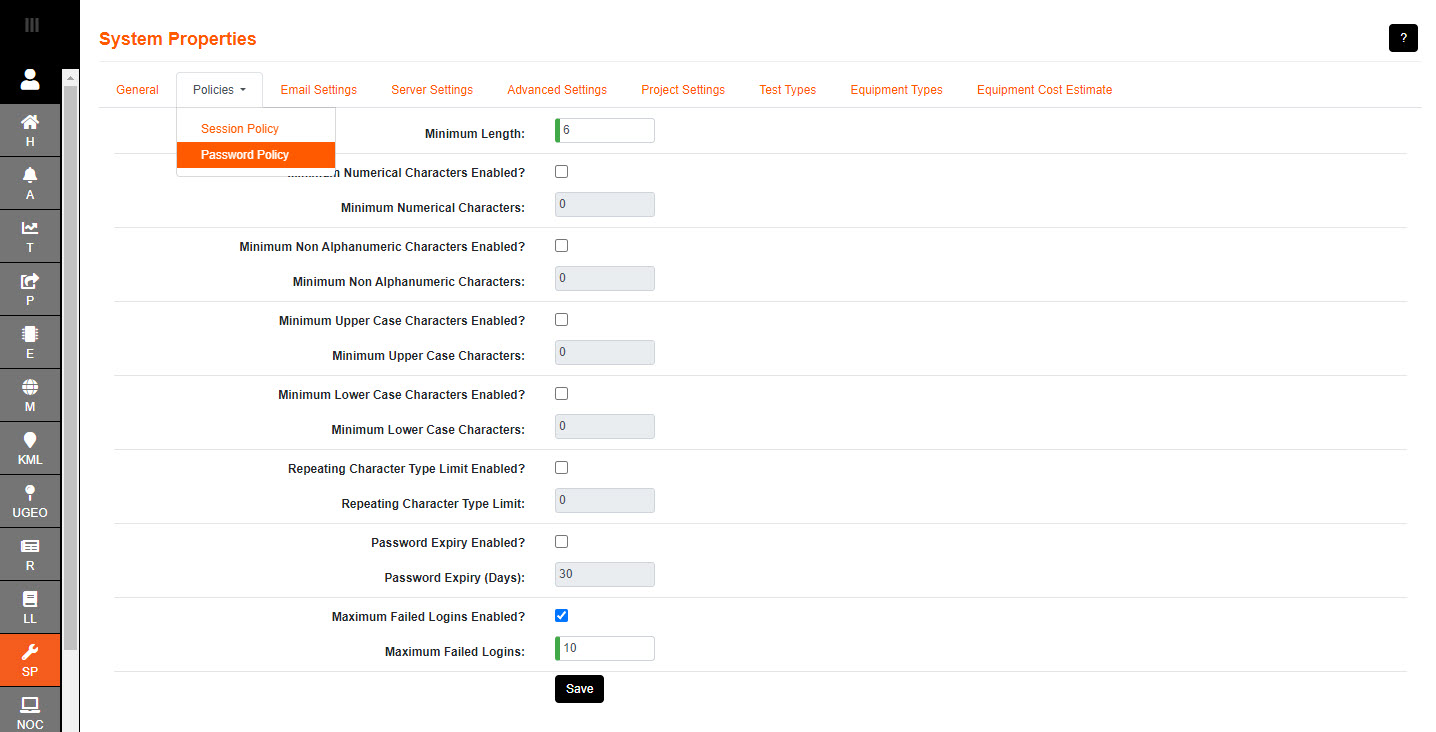
Minimum Length determines the minimum length of a password; defaults to 6 characters (minimum 1).
Minimum Numerical Characters Enabled? when ticked; controls whether a numeric character is required
Minimum Numerical Characters the minimum number of numerical characters required
Minimum Non-alphanumeric Characters Enabled? when ticked; control whether a character that
is not a number or letter is required in a new password
Minimum Non-alphanumeric Characters the number of non-alphanumerical characters required
Minimum Upper Case Characters Enabled? when ticked; controls whether an upper case character is required
Minimum Upper Case Characters the number of upper case characters required
Minimum Lower Case Characters Enabled? when ticked; controls whether a lower case character is required.
Minimum Lower Case Characters the number of lower case characters required
Repeating Character Type Limit Enabled? when ticked; controls whether a repeating character is allowed
Repeating Character Type Limit the number of repeating characters allowed
Password Expiry Enabled? when ticked; the password will expire
Password Expiry (Days) sets the number of days before a password expires (default is set to 30)
Maximum Failed Logins Enabled? when ticked; the account will be locked after a number of failed login attempts
Maximum Failed Logins the number of failed login attempts before account is locked (default is 5)
An unspecified minimum numerical characters, minimum non-alphanumeric characters, minimum upper case characters, minimum lower case characters and repeating character type limit allows for the most basic level of password security.